Skip to content
Team directory, skills map, and internal operations for marketing organizations

A roster that knows who can do the work.

Every person's skills, industries, and languages live in one record the whole company can search, and a weighted match ranks who actually fits a piece of work instead of who happens to be free.

The problem

  • Staffing a pitch means asking around whether anyone on the team speaks Portuguese and has done retail work, then hoping someone remembers correctly.
  • A new joiner can't find the document, the person, or the process to follow, so they ask a colleague, and now someone else's day has stopped too.
  • The org chart is a PDF somebody exported months ago, and half of the reporting lines on it are already wrong.

Not because the work is hard. Because nothing captured it.

/03

What it is

Skill*form is a people directory and operations system that gives an organization one record of who works there, what they can do, and how they are organized.

The same record runs the practical work of having people: staffing a service, onboarding a hire, tracking a policy acknowledgment, and running a review, instead of splitting each across a separate tool.

What someone can do is written down instead of stored in a colleague's memory.

Every person gets one record: skills with a proficiency level, industries, languages, career history, past agencies, and the brands they've managed, kept current by the person it belongs to.

Employee profiles

A new hire and a longtime employee start from the same current picture of the company, not a chart exported to PDF months ago.

Search the company by name, department, or role, and open a reporting-line chart rendered live from who actually manages whom today.

Directory and org chart

Staffing a pitch starts from a ranked list instead of three messages asking who's free.

Define what a service needs as required and preferred skills with a minimum proficiency, then run a match that scores every employee against it by proficiency and experience.

Service matching

A new hire has a checklist waiting on day one, and a manager approves a time-off request without a spreadsheet.

Build an onboarding template once, with tasks and due dates, and assign it to every new hire; separately, run time-off policies with balances, requests, and approvals.

Onboarding and time off

An audit question about who has read the current handbook has an answer, and a document never sits behind a link anyone could keep forever.

Publish a policy and track who has acknowledged the current version, with automatic re-acknowledgment when you publish a new one; store HR documents and company-wide files behind signed links that expire in under a minute.

Policies and documents

A manager starts a review from a draft grounded in what they already wrote, not a blank page, and pay stays out of the general directory by default.

Run goal cycles and performance reviews, built on competency frameworks an admin defines for the career ladder, where an AI-drafted narrative starts from a manager's own ratings and notes; keep pay bands and current pay visible to a manager for their reports, and full pay history visible only to the employee and whoever has explicit compensation access.

Performance, growth, and pay

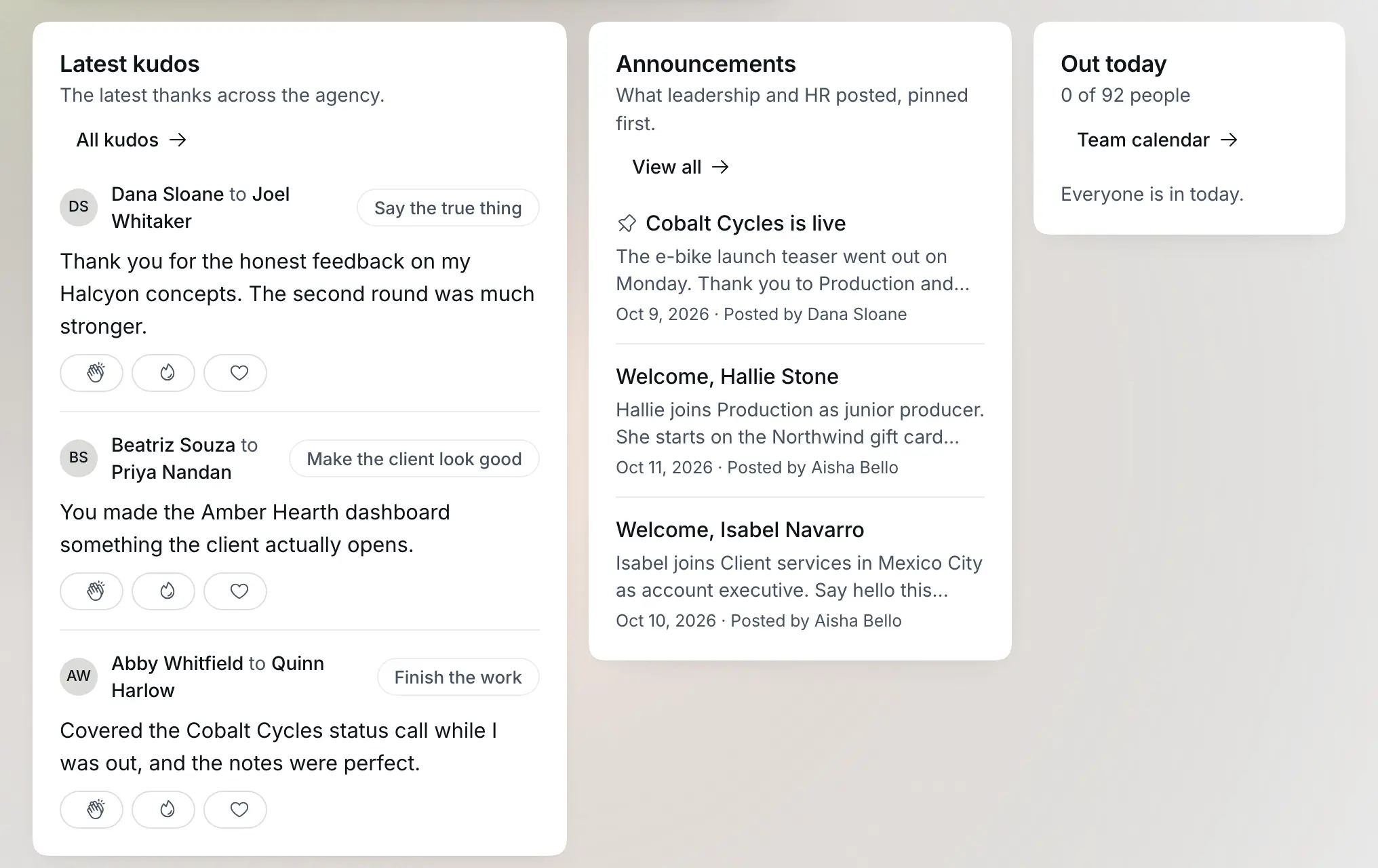
Recognition and internal communication happen in the same place as the roster, instead of scrolling out of view in a chat channel.

Post announcements, give peer recognition tied to your organization's own values, run events with RSVPs, organize groups, and draft a survey from a one-sentence intent that an admin edits before it goes out.

Recognition, events, and surveys
What it can do
/05

How it works

01

Set up departments, agencies, and levels

Build your org structure once: departments, offices or agencies if you run more than one, and a job-level ladder.

02

Add your people

Create or invite each person's record; from there, they maintain their own skills, industries, languages, and career history.

03

Search the directory or run a match

Look someone up by name or role, or define a service and run a match to get a ranked list of who actually fits it.

04

Turn on the rest as you need it

Onboarding templates, time-off policies, policy acknowledgment, review cycles, and recognition each switch on independently, when you're ready for them.

Standing alone

What you get owning only Skill*form

Every Skill*form capability works on a Skill*form-only account: profiles, directory, org chart, service matching, onboarding, time off, policy acknowledgment, documents, reviews, and recognition. Nothing here depends on another module being active, and one organization can run a single office or a multi-agency group under the same roster.

  • A searchable directory and a reporting-line chart built from real data, not a PDF
  • A weighted skill-to-service match, not a memory test
  • Onboarding, time off, reviews, and recognition running on one roster

How fits into the suite

Sends

  • approved time off and holidaysLive

    The execution signal

  • skills and availabilityComing

    The execution signal

  • who knows whatComing

    The memory signal

  • the rosterComing

    The infrastructure signal

  • the rosterComing

    The companion signal

Receives

Nothing yet: this is where it will show up as it ships.

Without the suite

A staffing decision starts with someone asking around chat who has bandwidth and the right skill for a project.

With it

's live talent map and service matching surface the right person before the ask goes out.

  • Entities exist once. A client, a brand, a campaign, a person, and a tool are defined in one place and referenced everywhere. No re-entry, no reconciliation, no version drift.
  • Context compounds. Work done in one app makes the others better at their job, because retains it. A point tool starts from zero on every task, forever.
  • The loop closes. Brief, work, performance, learning, next brief. No single purpose tool closes that loop, which is why agencies close it manually in decks and meetings.

Who it's for

Agency owners running multiple offices

One roster covers every office or agency in the group, so headcount, skills, and structure stay in one place instead of one spreadsheet per office.

HR and talent leads

Onboarding, time off, policy acknowledgment, reviews, and compensation records live in one system with real access control, instead of a folder of documents and a spreadsheet.

Account and traffic managers staffing work

A match ranks who actually fits a piece of work by skill and experience, so staffing starts from data instead of a memory of who did something similar last time.

What it replaces

A generic HR directory with job titles, a wiki nobody keeps current, and a spreadsheet of who speaks what

Most agencies default to whatever directory their HR system ships with, which tracks a job title and little else, then patch the gap with a wiki for policies and a spreadsheet someone updates by asking around before a pitch. Each piece drifts out of date the moment the person maintaining it gets busy with something else.

Before

Now

  • A directory that lists a job title and nothing about what the person can actually do

    A profile with real skills, proficiency, industries, languages, and project history

  • A wiki or shared drive nobody keeps updated once the launch enthusiasm wears off

    A directory and org chart that stay current because they are the same records people already use for onboarding and reviews

  • A spreadsheet somebody maintains by asking around before every pitch

    A weighted match that ranks people against what a service actually needs

  • Separate tools for onboarding, time off, reviews, and recognition

    One system, scoped to one organization

Where the AI stands

Models

Claude Sonnet 5 for review narratives, survey question drafts, and analytics summaries

What it decides

  • Drafting a performance review narrative from the ratings, notes, and goal progress a manager has already entered, without inventing a figure that isn't already in that material
  • Drafting a set of survey questions, in a mix of question types, from a one-sentence intent
  • Writing a short summary of whatever filtered analytics view is on screen, grounded only in the numbers on that screen

What it does not decide

  • Who fits a role or service: that score comes from a fixed formula weighing proficiency, whether a skill is required or preferred, and experience against what the service asks for, not a model's judgment
  • Whether a review narrative is final, whether a survey goes out, or who reports to whom: a manager edits and publishes the narrative, an admin reviews the questions before anything sends, and only an org admin can set a reporting line or level

Your data

Review notes, ratings, goal progress, a survey intent, or the numbers on an analytics screen reach Anthropic's commercial API only when you trigger one of those three actions, never on a schedule or in the background. No code or configuration in this product asserts a training or retention policy for those calls; that determination sits with Anthropic's own account-level API terms, not with anything this product controls.

Security

Isolation

Every profile, service, HR record, document, and review is scoped to your organization at the database level, checked on every read and write, with no path for one organization to query another's.

Access

Anyone with an active Skill*form seat can see every colleague's directory profile, by design: that shared visibility is what the directory is for. Each person edits their own bio, skills, languages, and project history; only an org admin can set someone's manager or job level, enforced by a database rule rather than left to convention. Compensation carries the narrowest access in the product: an employee sees their own current pay, band, and full pay history; their manager sees only that report's current pay and band, never the history; beyond that, pay data is visible only to whoever an admin has explicitly granted access to. Signal*form staff supporting your organization use the same broad access model every module in the suite does for skills, time off, and documents; compensation is the one deliberate exception, with no staff-support access to pay data at all.

Export

HR documents and company-wide shared files download through a signed link that expires in a minute, carrying the same access boundary as viewing them. Resource-library templates download as branded files the same way. There is no bulk export of the directory, reviews, or compensation data today.

Deletion

Deleting a document, a shared file, a service, an announcement, a group, a goal, or a manager's private note removes it immediately. There is no dedicated flow to delete an employee's whole record inside Skill*form; removing someone from the roster happens through organization membership, and there is no self-serve organization-level deletion today.

Proof

A match ranks people by score, not by memory

Run a match against a service and the result is a ranked list of employees who cleared the bar, each with the exact skills that matched, whether each was required or only preferred, and a score built from proficiency and experience. The org chart works the same way: rendered live from each person's actual manager, not redrawn by hand after a reorg.

Pricing

Single Tool

One signal, dialed in

/mo

billed monthly

  • Any one tool of the suite
  • 120 credits per month
  • 5 seats included
Start free trial

Base

The full suite, small team

/mo

billed monthly

  • Full connected suite
  • 600 credits per month
  • 5 seats included
  • Up to 10 clients
Start free trial
Most popular

Pro

Growing agency pace

/mo

billed monthly

  • Full connected suite
  • 1,800 credits per month
  • 15 seats included
  • Up to 25 clients
Start free trial

Agency

Full throttle, no limits

/mo

billed monthly

  • Full connected suite
  • 4,000 credits per month
  • 25 seats included
  • Unlimited clients
Start free trial

A credit is a prepaid token you spend each time the platform generates something with AI, like a brief or a report, so your plan includes a monthly batch and you can buy more when you run out.

See full pricing

Prices in USD. Annual billing shown per month, billed yearly. Taxes may apply by region.

Common questions

Get started042°196°308°351°

A roster that knows who can do the work.

Start free trial

Related