Skip to content
Multi-platform campaign analytics and reporting for marketing and advertising teams

One dashboard. Every campaign, already explained.

Connect the platforms a client advertises on, see the numbers behind every individual ad, and request an AI-written analysis, forecast, or alert scan whenever you need one.

The problem

  • A client's campaign runs on four different ad platforms, each behind its own login and its own dashboard, and the client wants one number, not four that don't match.
  • Building a client's monthly report means logging into every platform separately and copying numbers into a deck by hand, and that copying is most of what the two days actually go to.
  • The quality of the write-up in the deck depends on which analyst had time to draft it that week, not on what the campaign actually did.

Not because the work is hard. Because nothing captured it.

/03

What it is

Metric*form is a campaign analytics app that connects a client's ad platforms into one place and turns campaign data into AI-written analysis, forecasts, and alerts you request on demand.

It hands each client a branded, login-free view of their own numbers and gives your team a report template to build from instead of a blank spreadsheet.

One client record replaces seven browser tabs and seven separate logins.

Connect Meta (Facebook and Instagram), TikTok, LinkedIn, YouTube, Twitter/X, Snapchat, and Pinterest through one account login, or connect Google Analytics 4 and Shopify directly through their own login, each scoped to one client.

Platform connections

You can point at the specific ad earning its budget instead of guessing which one in the campaign is doing the work.

See every individual ad under a campaign by name, status, spend, impressions, clicks, and conversions, sorted by spend, not just the campaign total.

Creative-level analytics

The write-up reads the same way whether you ask for it Monday morning or Thursday at 6pm, and it doesn't depend on which analyst is free.

Request an analysis of a campaign and get a performance score, named strengths and weaknesses, and prioritized recommendations across budget, targeting, creative, and bidding, each with its expected impact, compared against your own stored industry benchmarks when they're set.

AI-written campaign analysis

A campaign headed for trouble shows up before the flight ends, not after the invoice.

Project a campaign's spend, conversions, revenue, and ROAS 7, 30, or 90 days ahead from its trailing performance, with a plain moving-average projection as a fallback if the AI call doesn't return one.

Performance forecasting

One scan checks every active campaign for the problems a person would otherwise have to catch one account at a time.

Run a rules pass across active campaigns that flags budget overpacing or underpacing, zero conversions on real spend, low click-through rate, scaling opportunities, and week-over-week click declines.

Automated alert scanning

A client checks their own numbers on their own schedule instead of waiting on your next update.

Generate a token-based link, no login required, branded with the client's own logo and color, that shows only that one client's campaigns.

White-label client portal

Every client's report starts from a structure that already exists instead of a blank spreadsheet each month.

Name a report template per client with a weekly or monthly cadence, generate it on demand, keep a history of every run, and export the dashboard's campaign and metric data to CSV.

Report templates and export
What it can do
/05

How it works

01

Add a client and connect a platform

Add a client, then connect Meta, TikTok, LinkedIn, YouTube, Twitter/X, Snapchat, or Pinterest through one login, or connect Google Analytics 4 or Shopify directly.

02

Sync and review what came in

Run a sync on each ad-platform connection to pull in campaigns and the numbers behind every individual ad. GA4 and Shopify connect the same way, but syncing their data in isn't built yet.

03

Request an analysis, forecast, or alert scan

Ask for an AI-written analysis of a campaign, a spend and ROAS forecast, or a scan across active campaigns for pacing and conversion problems, whenever you want one.

04

Build the report and share it

Set up a report template for the client, generate it when it's due, export the numbers to CSV, or hand the client a branded portal link that needs no login.

Standing alone

What you get owning only Metric*form

Platform connections, creative-level analytics, AI-written analysis and forecasts, alert scanning, report templates, and a white-label client portal all work on a Metric*form-only account. Nothing here depends on another module being turned on.

  • Client and campaign records with platform connections and creative-level, per-ad data
  • On-demand AI campaign analysis, forecasts, and alert scans
  • A branded, login-free portal link per client

How fits into the suite

Sends

  • what performedComing

    The creative signal

  • resultsComing

    The memory signal

  • delivery statusComing

    The execution signal

Receives

  • campaign definitionsComing

    The creative signal

  • flight datesComing

    The execution signal

  • brand and client entitiesComing

    The memory signal

Without the suite

A reporting analyst logs into four ad platforms, exports four CSVs, and stitches together a client dashboard by hand every Monday.

With it

connects the platforms, so Monday starts with one sync click per platform instead of four separate exports and a manual stitch-together.

  • Entities exist once. A client, a brand, a campaign, a person, and a tool are defined in one place and referenced everywhere. No re-entry, no reconciliation, no version drift.
  • Context compounds. Work done in one app makes the others better at their job, because retains it. A point tool starts from zero on every task, forever.
  • The loop closes. Brief, work, performance, learning, next brief. No single purpose tool closes that loop, which is why agencies close it manually in decks and meetings.

Who it's for

Media buyers

The per-ad breakdown shows which specific creative is earning its budget, not just which campaign, so the next optimization has a real target.

Account directors who present to clients

A branded portal link and an AI-written analysis mean the update a client sees doesn't depend on whoever had time to build the deck that week.

Performance leads

One alert scan across every active campaign catches an overpacing budget or a zero-conversion campaign, instead of checking each account by hand.

What it replaces

AgencyAnalytics, a Supermetrics-into-Looker-Studio pipeline, or a monthly deck someone builds by hand

AgencyAnalytics gives you prebuilt cross-platform dashboards with little setup. A Supermetrics-into-Looker-Studio pipeline takes more work to build but goes wherever your own data warehouse goes, which matters once an agency outgrows a fixed dashboard shape. A hand-built deck is fully tailored to exactly one client, at the cost of someone's time every month. Metric*form sits closer to the first two: built for an agency's client roster specifically, with less setup than a data pipeline and a narrower job than a general BI tool.

Before

Now

  • Each platform lives behind its own login and its own dashboard

    Meta, TikTok, LinkedIn, YouTube, Twitter/X, Snapchat, and Pinterest connect through one login

  • The write-up depends on who had time to draft it

    An AI-written analysis reads a campaign's performance and your stored benchmarks the same way every time you ask for one

  • A client waits on your next scheduled update

    A branded portal link needs no login and shows a client their own numbers whenever they check

  • Every report starts from a blank deck

    A report template per client is already there to generate from

Where the AI stands

Models

Claude Sonnet 5 for campaign analysis, forecasting, and account-wide insights

What it decides

  • Writing a campaign's performance analysis: a score, named strengths and weaknesses, and prioritized recommendations with their expected impact, compared against your own stored industry benchmarks when they're set
  • Projecting spend, conversions, revenue, and ROAS for a chosen number of days ahead, from a campaign's trailing performance, falling back to a plain moving average if the AI call fails

What it does not decide

  • Whether a budget changes, or a campaign pauses or resumes: every platform connection only reads that platform's API, and nothing in Metric*form writes back to Meta, Google Analytics, TikTok, LinkedIn, YouTube, Twitter/X, Snapchat, Pinterest, or Shopify
  • What a client sees or when: generating a report, exporting data, and sharing or revoking a portal link are a person clicking a button, never automatic

Your data

A campaign's name, platform, objective, budget, status, and performance metrics reach Anthropic's commercial API only when you request an analysis or a forecast, never on a schedule or in the background. No code or configuration in this product asserts a training or retention policy for those calls; that determination sits with Anthropic's own account-level API terms, not with anything this product controls.

Security

Isolation

Every client, campaign, connection, alert, forecast, and insight is scoped to your organization at the database level, checked on every read and write, with no path for one organization to query another's data.

Access

Access requires an active Metric*form entitlement plus a signed-in seat; exporting data or generating a client portal link needs an explicit permission beyond just holding a seat, which organization owners and admins always have. A portal link is a random token in the URL, not a login: whoever holds it sees that one client's own campaigns and nothing about any other client in your organization, and revoking the link ends access immediately. Signal*form staff can access any organization's Metric*form data for support, the same support model every module in the suite uses.

Export

CSV export from the dashboard runs on data your session already has permission to see, gated by the same export permission that controls it in the app, so it carries the same access boundary as viewing the dashboard.

Deletion

Deleting a client removes it, and every campaign, connection, alert, forecast, insight, and portal link attached to it, immediately. There is no self-serve organization-level deletion today.

Proof

A campaign page with real per-ad numbers, not a mockup

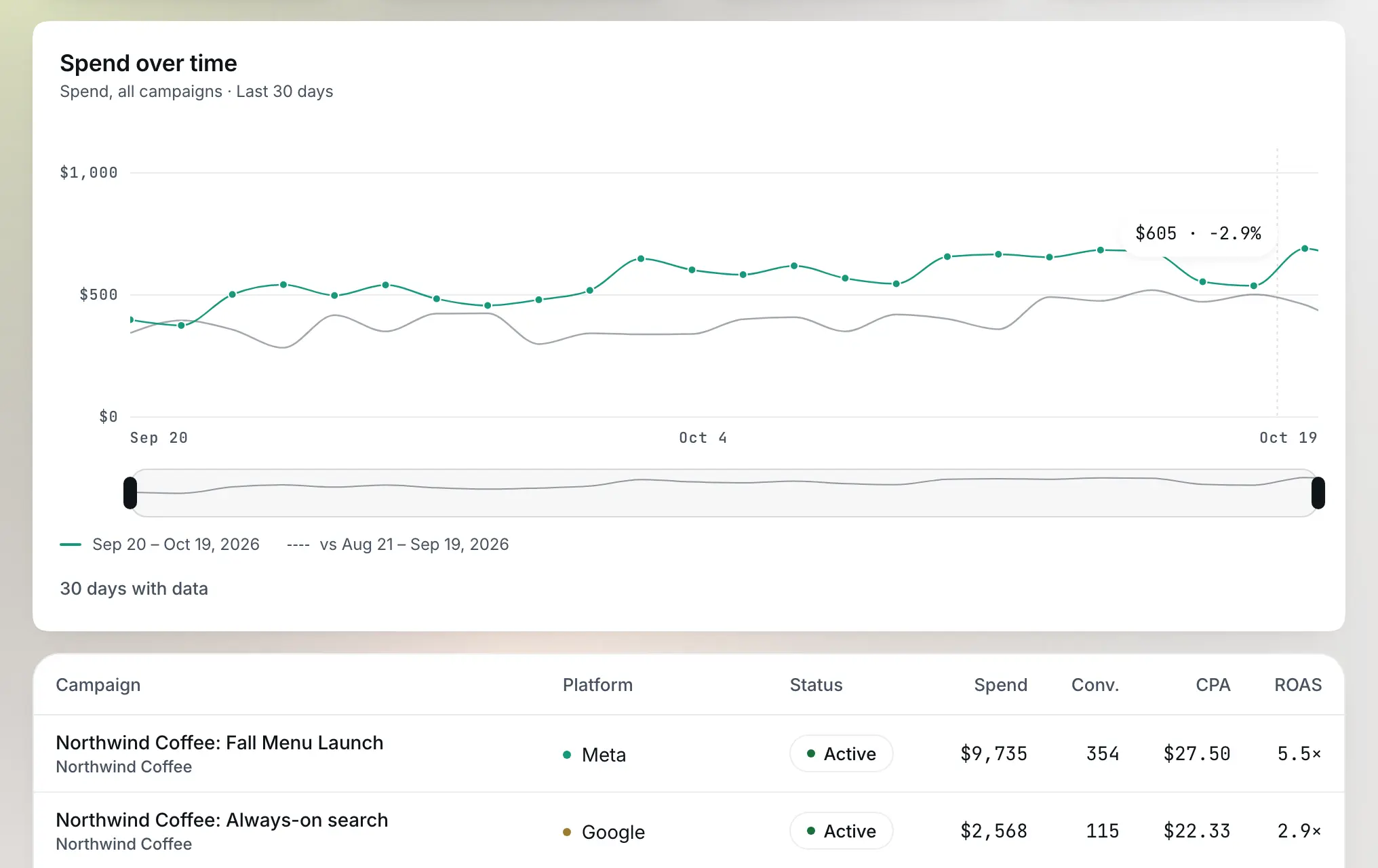
Open a campaign and the creative breakdown lists every individual ad by name, status, spend, impressions, clicks, and conversions, sorted by spend, sourced from the connected platform. A white-label portal link shows a client that same campaign list next to their own logo and brand color, with no Signal*form login anywhere on the page.

Example data: a sample Metric*form client-ready performance view

Pricing

Single Tool

One signal, dialed in

/mo

billed monthly

  • Any one tool of the suite
  • 120 credits per month
  • 5 seats included
Start free trial

Base

The full suite, small team

/mo

billed monthly

  • Full connected suite
  • 600 credits per month
  • 5 seats included
  • Up to 10 clients
Start free trial
Most popular

Pro

Growing agency pace

/mo

billed monthly

  • Full connected suite
  • 1,800 credits per month
  • 15 seats included
  • Up to 25 clients
Start free trial

Agency

Full throttle, no limits

/mo

billed monthly

  • Full connected suite
  • 4,000 credits per month
  • 25 seats included
  • Unlimited clients
Start free trial

A credit is a prepaid token you spend each time the platform generates something with AI, like a brief or a report, so your plan includes a monthly batch and you can buy more when you run out.

See full pricing

Prices in USD. Annual billing shown per month, billed yearly. Taxes may apply by region.

Common questions

Get started042°196°308°351°

One dashboard. Every campaign, already explained.

Start free trial

Related